
ธีมเว็บ: Site Happens
เอามาโปรยไว้ก่อน ด้วยรับปากเหล่าสาวกเวิร์ดเพรสไว้ว่าจะทำ WordPress Theme ให้เอาไปแก้ง่ายๆ ตั้งนานแล้ว ยังไงเดี๋ยวจะมาเพิ่มข้อมูลนะครับ
Download Site Happens WordPress Theme (Version 0.5)
เป็นธีมของเวิร์ดเพรสที่ออกแบบมาให้คนสามารถนำไปแก้ และทำเป็นเว็บไซต์ทั่วไปได้ง่ายๆ นะครับ มีระบบ Banner แบบบ้านๆ ได้ เริ่มต้นจากทำเว็บให้ท่านปลา ชื่อว่า Plajazz.com แล้วก็เอาไปทำต่อให้ MHS IT VALLEY (แม่ฮ่องสอน ไอที วัลเลย์) หลายเดือนผ่านไป จึงมีโอกาสเอามาแจกซักที
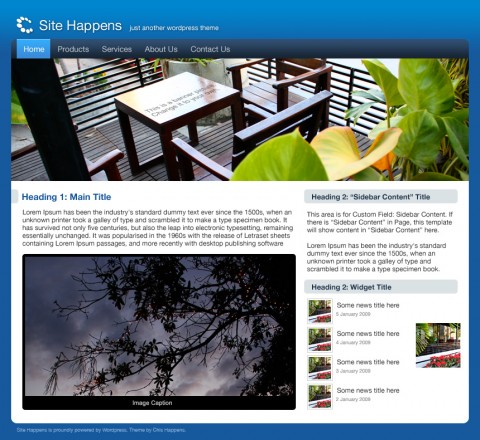
หน้าตาธีม Site Happens
เอาข้อมูลที่เขียนเป็นภาษาอังกฤษไปก่อนละกัน
INSTALLATION
- Download Site Happens Theme
- Unpack the zip file. You will find 3 Folders
design: the Photoshop file
plugins: the plugin needed, the-attached-image
themes: sitehappens folder - Upload by using FTP program to your WordPress site.
plugins/the-attached-image: to /wp-content/plugins/the-attached-image
themes/sitehappens: to /wp-content/themes/sitehappens - Activate the theme through the ‘Appearance’ menu in WordPress
- Activate the plugin through the ‘Plugins’ menu in WordPress …
- Done, enjoy!
TERMS OF USE:
* Please leave the link in the footer, or donate if you would like to remove it.
* You are free to share, to copy, distribute and transmit this theme. You are not allowed to sell this theme.
เครดิตงาน
ภาพถ่าย: โดยคุณพัช จาก iSchool นะครับ ถ่ายจากร้าน June’s House ของพี่สาวกระผม ปลั๊กอินแสดงไอคอน: the-attached-image ซึ่งเปลียนจาก get-the-image ที่เคยใช้ เพราะมันออกเวอร์ชันใหม่ แล้วกระผมใช้งานไม่ได้ซักที เลยเปลี่ยนปลั๊กอินซะเลย
ข้อควรรู้เวลานำไปใช้
- ควรเปิดไฟล์งาน Photoshop มาแก้นะครับ แล้ว Save for web มาไว้ที่ folder ชื่อ images
- Logo (logo.jpg) สูง 70px กว้างเท่าไหร่ก็ได้
- Banner (banner.jpg) ขนาด กว้าง 820px สูง 220px
- ถ้าอยากเปลี่ยนสีได้ ต้องลองดิ้นรนนิดนึงครับ เปลี่ยนจากรูปใน Photoshop ก่อน แล้วไปเปลี่ยนใน CSS อีกต่อ
- ถ้าอยากมี Banner หลายๆ แบบ เหมือนของ Plajazz ก็ save banner ไว้ แล้วใส่เพิ่ม Custom Field ของ Post/Page นั้นๆ ชื่อ “Banner URI” ใส่ค่า URI ไป เช่น /wp-content/uploads/banner.jpg
- Sidebar ผมเขียนเงื่อนไขใน sidebar.php ไว้ว่า ถ้าหาก Page ไหน มี Custom Field ชื่อ “Sidebar Content” ให้ไปเอาข้อมูลใน Field นี้มาโชว์ แล้วไม่ต้องโชว์ข้อมูลอื่นๆ ของ Sidebar อีก ถ้าไม่ชอบก็ไปแกะ sidebar.php เอาละกันนะครับ
- ใน WordPress -> Setting -> Media ควรตั้ง Thumbnail เป็น 80 x 80 Crop และ Medium Size มี Max Width ที่ 480px